





Build end-to-end workflows spanning your entire IT environment with ActiveBatch’s comprehensive library of integrations and extensions
Find Out More
ActiveBatch connects to any server, any application, any service - giving you limitless endpoints.
Easily build reliable, customizable end-to-end processes 50% faster with ActiveBatch’s hundreds of drag-and-drop actions and robust Job Step library.

Our proactive support, in-app knowledgebase and vision for a self-healing platform make ActiveBatch the most stable platform on the market.
ActiveBatch provides a central automation hub for scheduling and monitoring so that business-critical systems, like CRM, ERP, Big Data, BI, ETL tools, work order management, project management, and consulting systems, work together seamlessly with minimal human intervention.
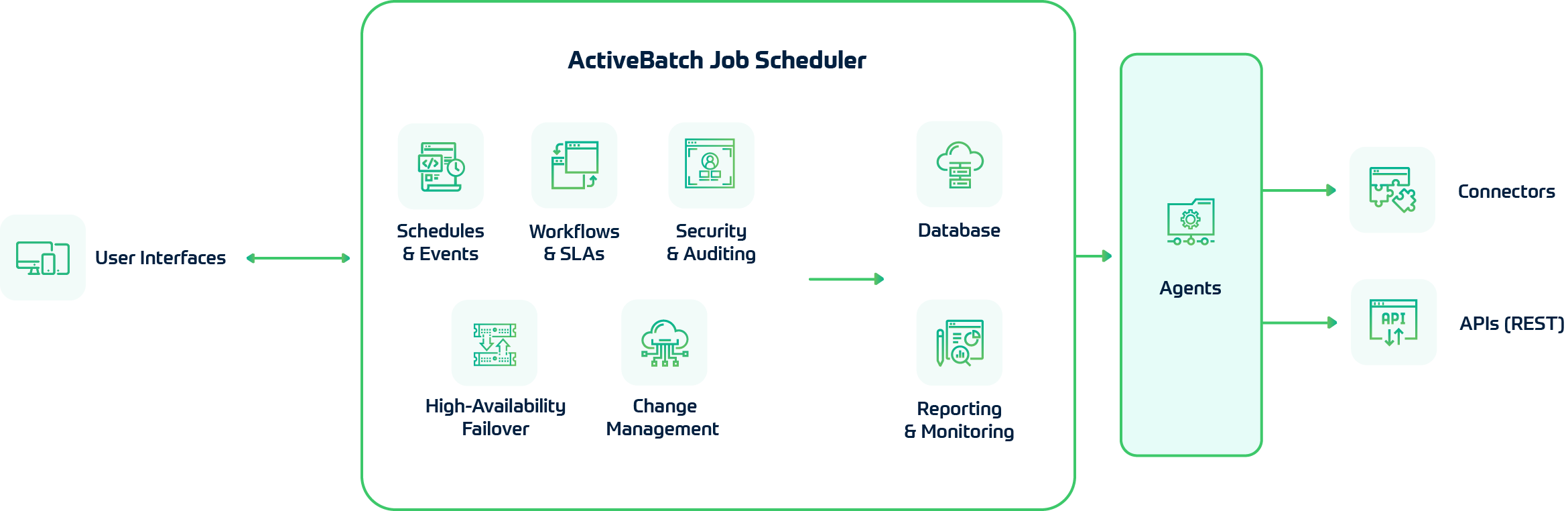

Access ActiveBatch from any device with flexible interfaces that give you powerful out-of-the-box functionality and the ability to customize.

The job scheduler is the brain of workload automation architecture, allowing you to build and orchestrate cross-functional workflows. It handles load balancing, scheduling, dependency checking, reporting and notifications.

Connect ActiveBatch to any server, application or service to orchestrate workflows that run jobs on endpoints across your entire stack.
ActiveBatch elevates your IT automation strategy by centralizing your processes into one solution — allowing you to manage everything in a single platform.
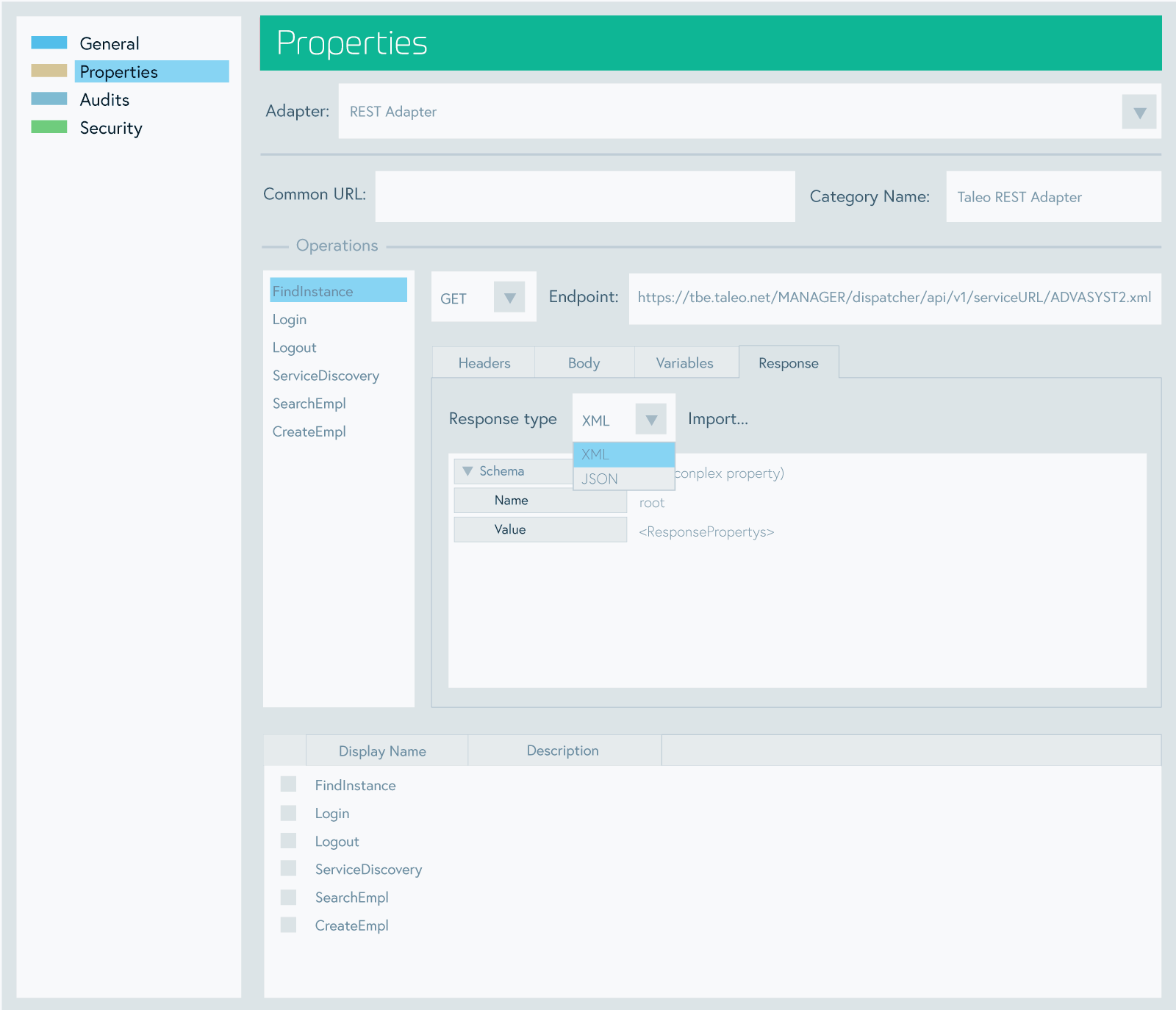
Future-proof your automation with our flexible, extensible REST API adapter. Know that you can connect to any tool in your stack now — and those you add in your five-year plan.
Take full advantage of API-first development and adapt to a rapidly changing landscape of software capabilities and business priorities with ActiveBatch’s sophisticated REST API Adapter. Quickly create secure connections to any software or service with an API, extending automation to any endpoint.

Additionally, we have rigorously maintained and tested connectors to these common systems:

"ActiveBatch is an easy-to-use, easy-to-install product with a rich jobs library at a competitive total cost of ownership."

"ActiveBatch is a great choice to manage a diverse IT landscape... within a single unified console designed for operational efficiency."

G2 named ActiveBatch a Leader in the Managed File Transfer category and a High Performer in Workload Automation for Fall 2020.

Coordinate enterprise-wide MFT processes using dozens of prebuilt actions for common file operations.

Simplify processes and governance for database operations, ETL tasks and Hadoop workloads.

Gain peace of mind by reducing manual tasks, preventing delays and auto-remediating issues.

Accelerate your digital transformation by orchestrating BI, ERP and BPM processes across the enterprise.

Integrate and schedule scripts of any language into end-to-end, cross-platform workflows.

Deliver the right resources at the right time with dynamic provisioning and cloud management tools.
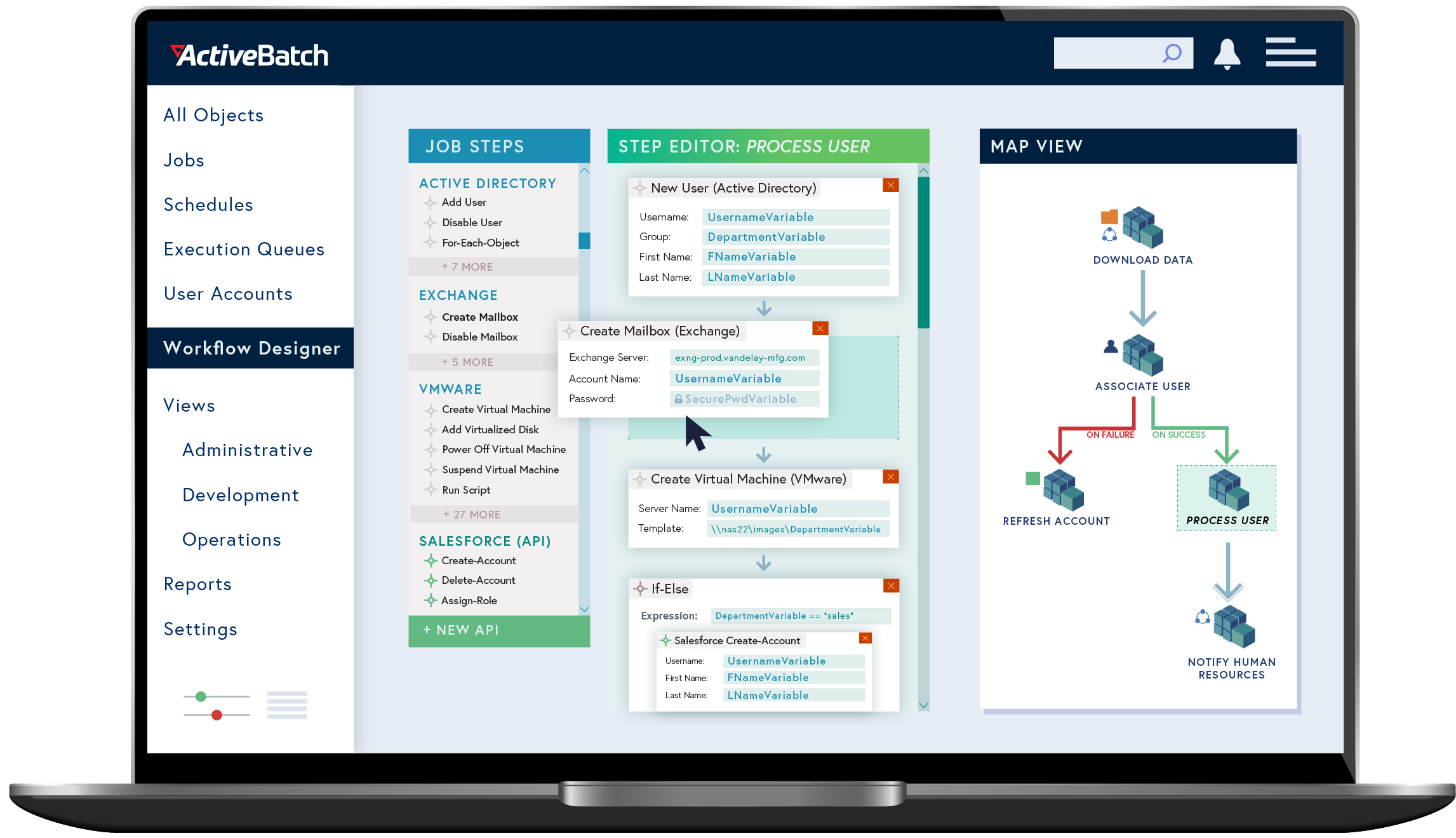
Focus on the function, rather than the coding of workflows using hundreds of production-ready Job Steps and an intuitive graphical development environment.
A rich content library consisting of hundreds of production-ready Job Steps – out-of-the-box building blocks for commonly scripted actions and functions – ready for assembly into IT and business workflows.
Reduce slack time and improve job success rates with ActiveBatch's rich, event-driven architecture and advanced, customizable date/time scheduling options.
Get seamless machine scalability with machine learning models that analyze historical instance data and predict optimal systems and virtual machine allocation.
Ensure a highly reliable approach to managing objects across different scheduling environments. Included in the core license, these tools give you the ability to easily move workflows between Dev and Production.
Experience reliable high availability in the event of a potential outage or failure. Jobs and plans are redirected to standby systems so they are completed on or near schedule.
Immediately highlight every workflow’s critical path with a push of a button, allowing you to speed up run times by running non-dependent steps concurrently.
Role-specific views let every department focus on the metrics that matter most. The Operations view shows job progress and status. Map View makes it easy for developers to build and optimize workflows.
Democratize automation within IT and for your user community with self-service portals.
ActiveBatch supports the Windows Security Model, including Kerberos and Active Directory, allowing organizations to manage access with their existing accounts and groups.
Implement policy-driven governance throughout with capabilities such as revision history, policy authorizations, auditing, and advanced SLA management.
ActiveBatch gives you the critical data you need to monitor and optimize your IT and business operations. Stay ahead of issues using proactive monitoring and alerting, delivered in a variety of channels.

Steve Schneider, System Administrator and Automation Specialist, First Rate
Garry Lengthorn, Director of IT Services, SThree
Matt Sullivan, BI Manager, PrimeSource

Your success starts with onboarding. We work side-by-side with you, actively guiding you through the installation and configuration process. We also go through training with your team so they can build what you need for your unique business requirements.
We want to ensure you’re getting the most from your investment. Our Customer Success team conducts periodic health checks to assess the maturity of your ActiveBatch configuration across four key success factors. You’ll get specific recommendations to improve efficiency and reliability.
At ActiveBatch, support is available whenever you need it. You get direct access to our in-house experts and a Knowledgebase of hundreds of support articles and tactical, how-to videos. Continue building your expertise through Redwood University, with more than 300 courses and modules.

Our experts will run your actual jobs in ActiveBatch so you see how it simplifies your automation environment. Get your questions answered as you see how easy it is to build and maintain your jobs in ActiveBatch.
Get a Demo


